 Image 1 of 2
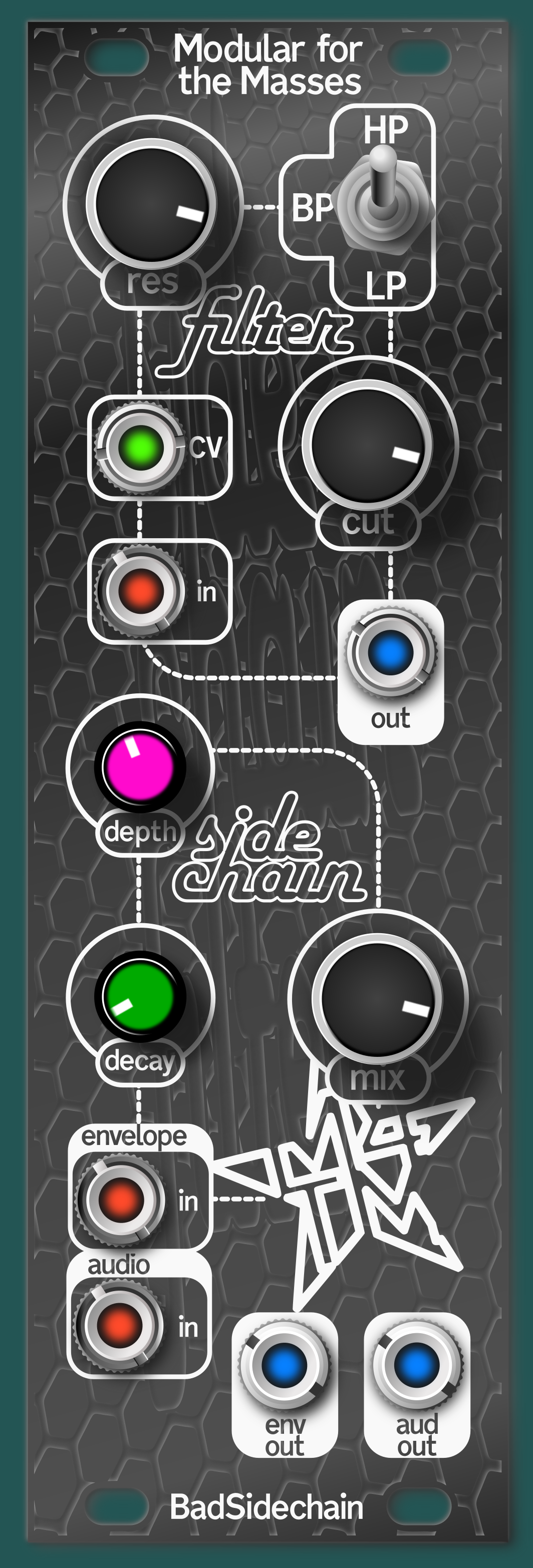 Image 2 of 2
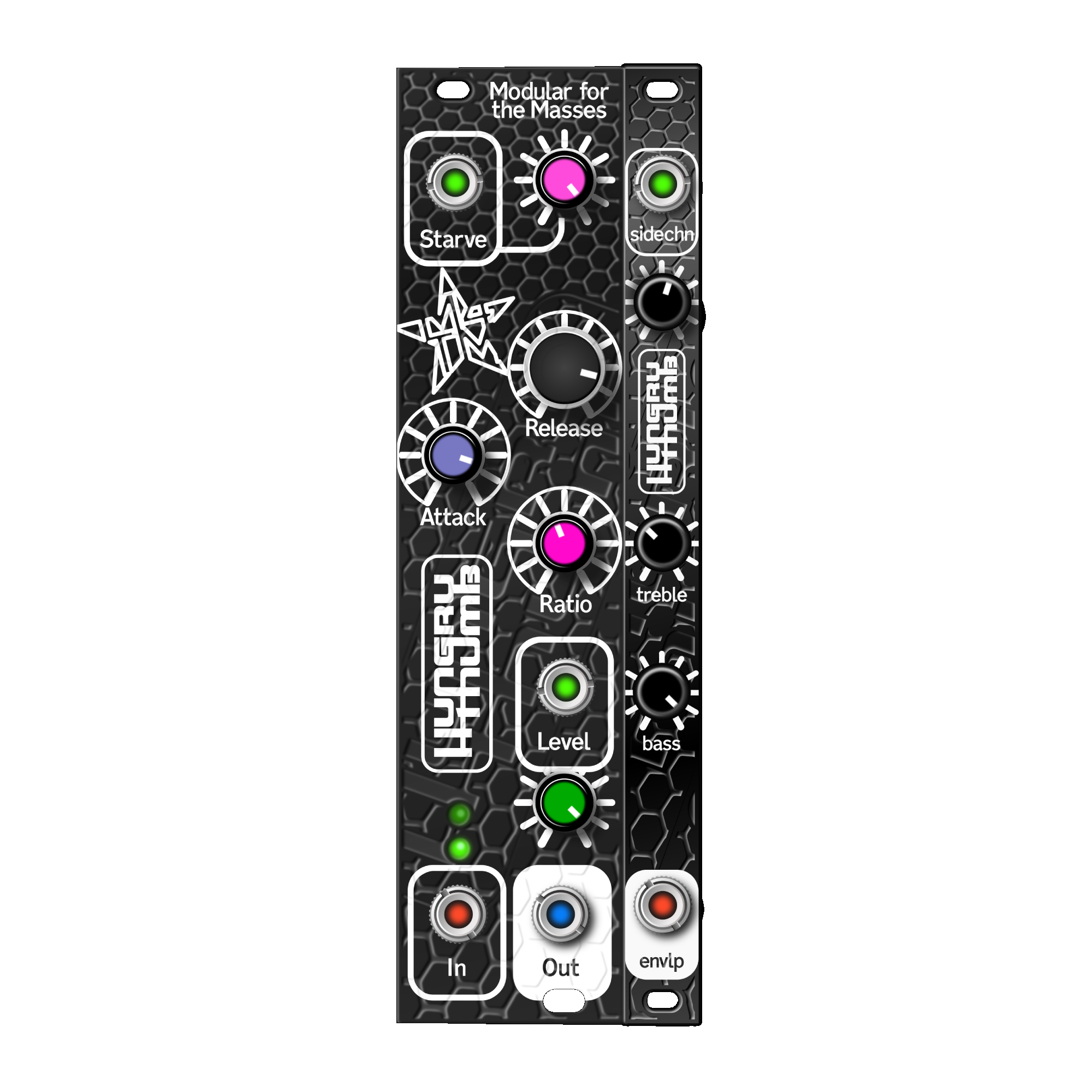
"Is there a state-variable filter that feeds a sidechain?" tweeted a famous Youtuber way back in the mists of time when it was still called Twitter. I don't think there was at the time, but there is at least one now! And it's this: the BadSidechain - available built or as a simple SMT-prepopulated DIY kit.
The top half of this module is a nice controllable state-variable VCF that can do high-pass, band-pass, and low-pass. The filter can be used by itself. It won't self-oscillate, but if you send it a ping of voltage, it will ring wonderfully. It can do wood blocks to a basic kick.
The bottom half of the module is the envelope follower and the VCA.
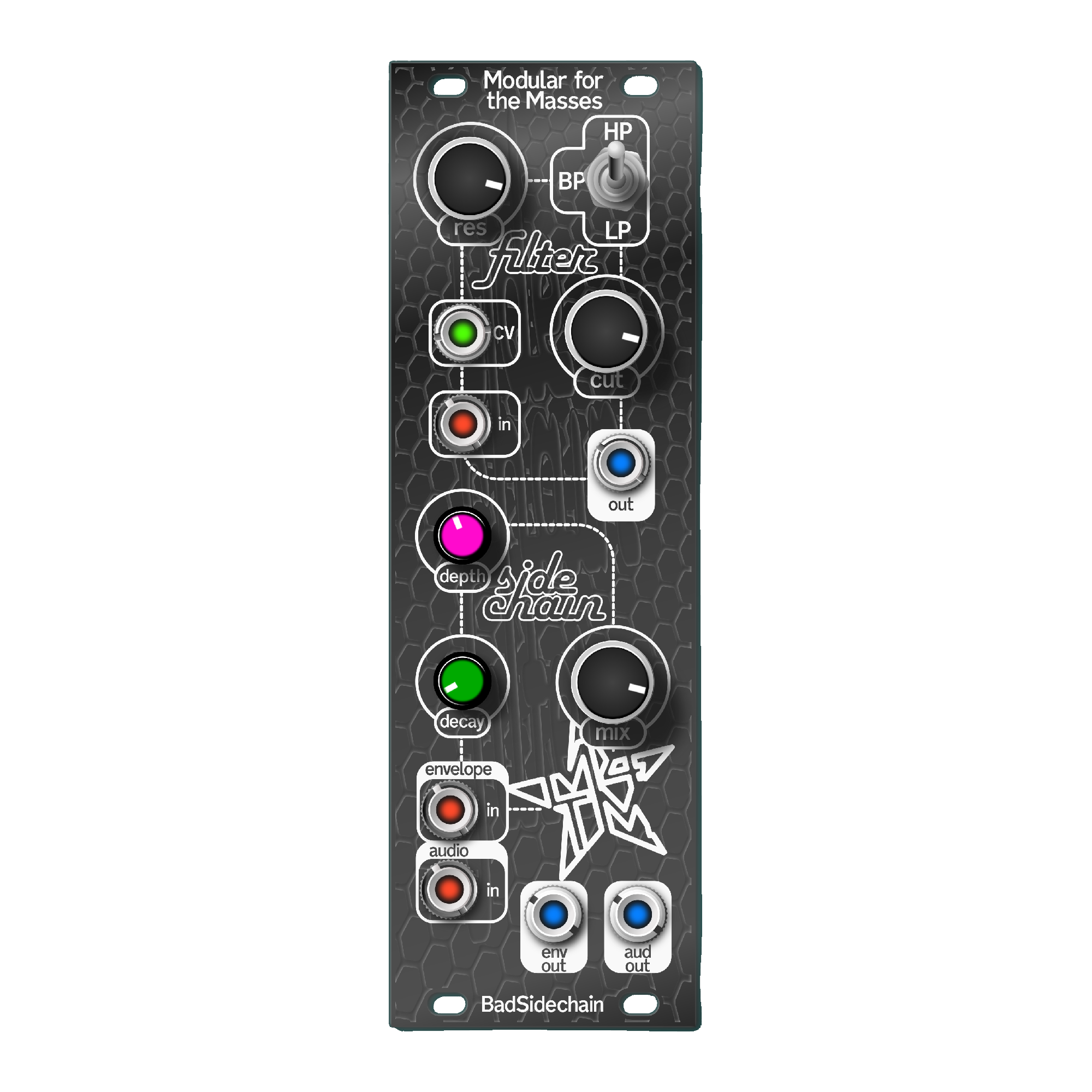
Here's the knob and jack rundown starting at the top.
FILTER SECTION
"res" knob: sets the resonance of the filter. Don't be afraid of this knob, it won't get unstable and scream feedback at you.
Switch: switches between high-pass, band-pass, and low-pass.
"CV" jack: this is for voltage-control of the filter
"cut" knob: sets the cutoff frequency of the filter
"in" jack: here's an input sends a signal to the filter. This signal normals down to the "audio in" jack on the bottom left of the module, which makes an unfiltered, VCA'ed copy available at the "aud out" output jack. The "mix" knob will send a non-VCA'ed copy to the "aud out" jack as well.
"out" jack up in the filter section: here's where you get the filtered output of whatever you have plugged in up here.
SIDECHAIN SECTION
"depth" knob: the signal coming out of the filter gets sent to an envelope follower. This knob sets how "high" the envelope can get.
"decay" knob: this sets the decay of the envelope.
"mix" knob: this brings a copy of whatever signal is being fed to the filter, but pre-filtering.
"envelope in" jack: put a signal here to send to the envelope generator, disconnecting the post-filter signal that's normally sent to the envelope generator. There's no way to get this audio signal back out of the module.
"audio in" jack: here's the main signal you want sidechained. This signal goes straight through the VCA section of the module, right to the "out" jack.
"env out" jack: whatever envelope is controlling the VCA of the module is available here. The LED shining through the "decay" knob shows how high this envelope will be.
"aud out" jack: the audio that's been sent through the VCA, mixed with the pre-filtered signal that may be plugged in to the "in" jack in the filter section, as set by the "mix" knob.
That's all the controls.
What do the lights mean?
"depth" light: this is a bipolar LED that lights up with whatever signal is going to the envelope follower.
"decay" light: this lights up with the envelope. A touch of decay can make the envelope follower more sensitive.
As with all recent M4TM modules, jack LEDs are as follows:
red - input
green - CV input
blue - output
pink/orange - hard-to-categorize
white - special output like stereo
PATCH IDEAS
Trance-Kick
Plug a kick drum into the "in" jack up top Plug a bassline into the "audio in" jack Take your output from "aud out", mixing the pure, unfiltered kick drum signal in with the "mix" knob. Pumping kick-ducked bassline. More room for those bass frequencies without getting muddy
Auto-wow
Plug an amplified guitar into the "in" jack up top Patch the "env out" output to the "CV" input of the filter Take your output from the "out" jack in the filter section. When you play loudly, the filter cutoff will "turn up" with the envelope. Auto-wow! with this patch, there's a non-filtered copy of the signal available at the "aud out" jack, affected by the VCA (mix knob fully counter-clockwise) or full-volume (mix knob fully clockwise).
Compressor
Plug a variable-amplitude signal into the "in" jack up top. Take your output from the "aud out". With the "mix" knob fully CCW, your input will be VCA'ed by the filtered version of the input signal. The non-VCA'ed signal is available with the "mix" knob fully CW. Use this patch with vocals, field recordings, or music, and have the signal get "turned down" or basically compressed by treble, bass, a particular frequency. Fun!
Oh, and you could maybe add bold headers to the other two patch ideas like Auto-wow and Trance-Kick and maybe make the "Pumping kick-ducked basslines" part of that first patch idea be in italics
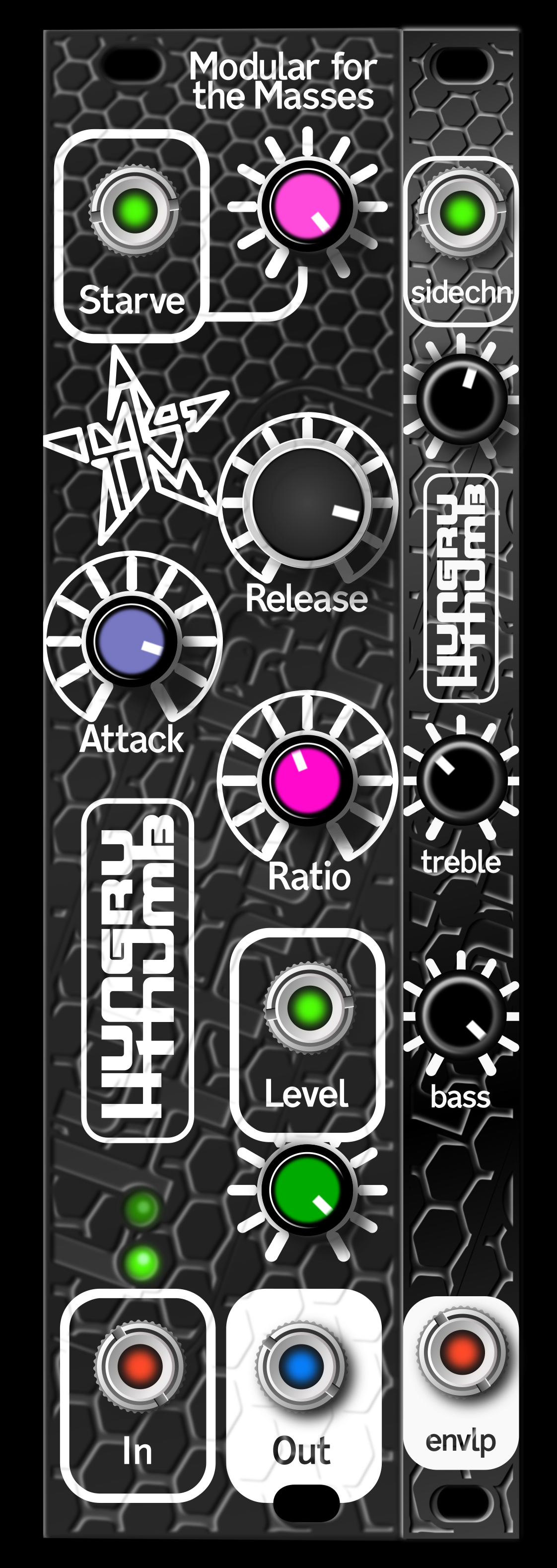
"Is there a state-variable filter that feeds a sidechain?" tweeted a famous Youtuber way back in the mists of time when it was still called Twitter. I don't think there was at the time, but there is at least one now! And it's this: the BadSidechain - available built or as a simple SMT-prepopulated DIY kit.
The top half of this module is a nice controllable state-variable VCF that can do high-pass, band-pass, and low-pass. The filter can be used by itself. It won't self-oscillate, but if you send it a ping of voltage, it will ring wonderfully. It can do wood blocks to a basic kick.
The bottom half of the module is the envelope follower and the VCA.
Here's the knob and jack rundown starting at the top.
FILTER SECTION
"res" knob: sets the resonance of the filter. Don't be afraid of this knob, it won't get unstable and scream feedback at you.
Switch: switches between high-pass, band-pass, and low-pass.
"CV" jack: this is for voltage-control of the filter
"cut" knob: sets the cutoff frequency of the filter
"in" jack: here's an input sends a signal to the filter. This signal normals down to the "audio in" jack on the bottom left of the module, which makes an unfiltered, VCA'ed copy available at the "aud out" output jack. The "mix" knob will send a non-VCA'ed copy to the "aud out" jack as well.
"out" jack up in the filter section: here's where you get the filtered output of whatever you have plugged in up here.
SIDECHAIN SECTION
"depth" knob: the signal coming out of the filter gets sent to an envelope follower. This knob sets how "high" the envelope can get.
"decay" knob: this sets the decay of the envelope.
"mix" knob: this brings a copy of whatever signal is being fed to the filter, but pre-filtering.
"envelope in" jack: put a signal here to send to the envelope generator, disconnecting the post-filter signal that's normally sent to the envelope generator. There's no way to get this audio signal back out of the module.
"audio in" jack: here's the main signal you want sidechained. This signal goes straight through the VCA section of the module, right to the "out" jack.
"env out" jack: whatever envelope is controlling the VCA of the module is available here. The LED shining through the "decay" knob shows how high this envelope will be.
"aud out" jack: the audio that's been sent through the VCA, mixed with the pre-filtered signal that may be plugged in to the "in" jack in the filter section, as set by the "mix" knob.
That's all the controls.
What do the lights mean?
"depth" light: this is a bipolar LED that lights up with whatever signal is going to the envelope follower.
"decay" light: this lights up with the envelope. A touch of decay can make the envelope follower more sensitive.
As with all recent M4TM modules, jack LEDs are as follows:
red - input
green - CV input
blue - output
pink/orange - hard-to-categorize
white - special output like stereo
PATCH IDEAS
Trance-Kick
Plug a kick drum into the "in" jack up top Plug a bassline into the "audio in" jack Take your output from "aud out", mixing the pure, unfiltered kick drum signal in with the "mix" knob. Pumping kick-ducked bassline. More room for those bass frequencies without getting muddy
Auto-wow
Plug an amplified guitar into the "in" jack up top Patch the "env out" output to the "CV" input of the filter Take your output from the "out" jack in the filter section. When you play loudly, the filter cutoff will "turn up" with the envelope. Auto-wow! with this patch, there's a non-filtered copy of the signal available at the "aud out" jack, affected by the VCA (mix knob fully counter-clockwise) or full-volume (mix knob fully clockwise).
Compressor
Plug a variable-amplitude signal into the "in" jack up top. Take your output from the "aud out". With the "mix" knob fully CCW, your input will be VCA'ed by the filtered version of the input signal. The non-VCA'ed signal is available with the "mix" knob fully CW. Use this patch with vocals, field recordings, or music, and have the signal get "turned down" or basically compressed by treble, bass, a particular frequency. Fun!
Oh, and you could maybe add bold headers to the other two patch ideas like Auto-wow and Trance-Kick and maybe make the "Pumping kick-ducked basslines" part of that first patch idea be in italics